Why the Color Wheel actually matters
Let’s be honest for a second: picking colors is hard. We’ve all been there—staring at a blank dark mode design or a logo drafts, dragging a color picker randomly, and feeling like everything just looks "off." That is exactly why the color wheel exists.
It isn’t just some dusty diagram from high school art class. It is the ultimate cheat sheet for designers. Whether you’re building a website, painting a room, or choosing an outfit, the color wheel removes the guesswork. It turns "I think this looks good" into "I know this works scientifically."
Decoding the Wheel: How to speak "Color"
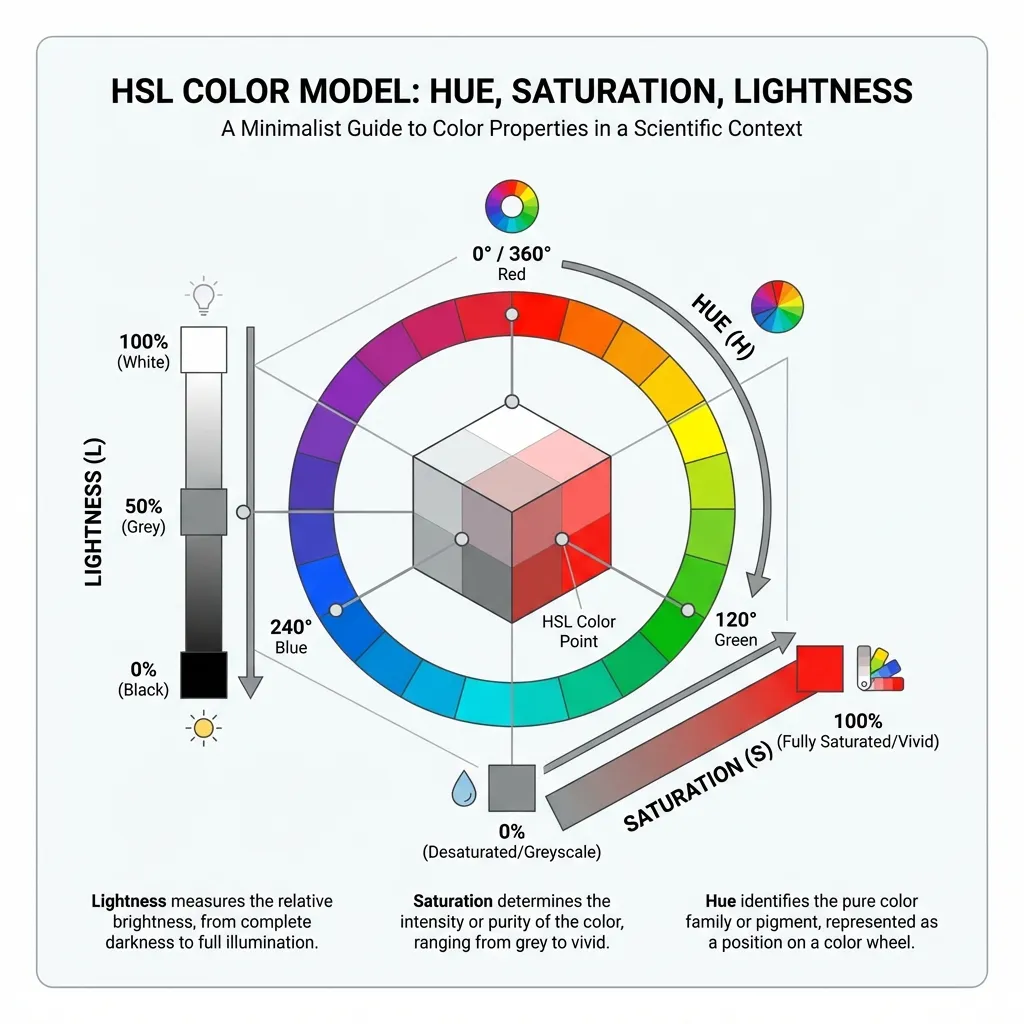
In the digital world, we don't mix paint buckets; we mix light. To master the color wheel, you only need to understand three simple concepts. Think of it like cooking:
- Hue (The Flavor): This is the color family itself. Red, Blue, Purple. On our wheel, picking a Hue is like choosing whether you want a strawberry or a mint dessert.
- Saturation (The Spice): How intense is the color? 100% saturation is like pure fruit concentrate—vivid and loud. 0% is grayscale—washed out and muted.
- Lightness (The Cooking Time): How much white or black is mixed in? High lightness gives you pastels (tints), while low lightness gives you deep, moody dark mode shades (shades).
Your Roadmap to Harmony
Creating a palette isn't about blind luck. It's about geometry. Different shapes on the color wheel create different emotional vibes. Here is how to use them:
Analogous (The Neighbors)
These colors sit right next to each other (like Blue, Blue-Green, and Green). They are the "safe bet"—easy on the eyes, serene, and professional. Use this for corporate sites or calming apps.
Complementary (The Opposites)
Red and Green. Blue and Orange. These colors are mortal enemies on the wheel, which means they create maximum contrast. Use this sparingly for Call-to-Action buttons that need to scream "Click Me!"
Psychology: Colors speak louder than words
Did you know that fast-food chains use Red and Yellow (warm colors) because they trigger hunger and urgency? Or that banks use Blue (cool color) because it subconsciously signals trust and stability?
Your choice of color harmony sets the mood before a user reads a single word. Warm colors advance and energize; cool colors recede and calm. When you rotate the handles on our wheel, you aren't just changing hex codes—you're changing the emotion of your project.
The 60-30-10 Rule: How to use your palette
Once you've exported your palette from our tool, how do you apply it? The industry standard is the 60-30-10 Rule. Think of it like a business suit:
- 60% (The Trousers & Jacket): Your dominant color. Usually a neutral background (white, dark grey, or a very soft tint). It holds the design together.
- 30% (The Shirt): Your secondary color. Used for cards, headers, or finding visual interest.
- 10% (The Tie): Your accent color. The boldest color on your wheel. Used strictly for buttons, links, and alerts.
This rule is referenced in the Interaction Design Foundation's color theory guidelines and applied universally across UI, interior design, and brand identity disciplines.
Frequently Asked Questions
Can I use this color wheel for print design?
Why does my generated palette look different on my phone?
How do I ensure my colors are accessible?
Explore More Color Tools
Build your complete color workflow with our suite of free tools: